In this post, we are going to create a simple Restful web service that returns json.
This post follows on from Create Restful Web Services with JBoss, Maven, Apache CXF and Spring, but is also self-contained.
Create the Project
Using Eclipse / JBoss Developer Studio
- New -> Maven Project
- maven-archetype-webapp
- Group Id: com.skills421.webservices
- Artifact Id: SimpleCXFRest
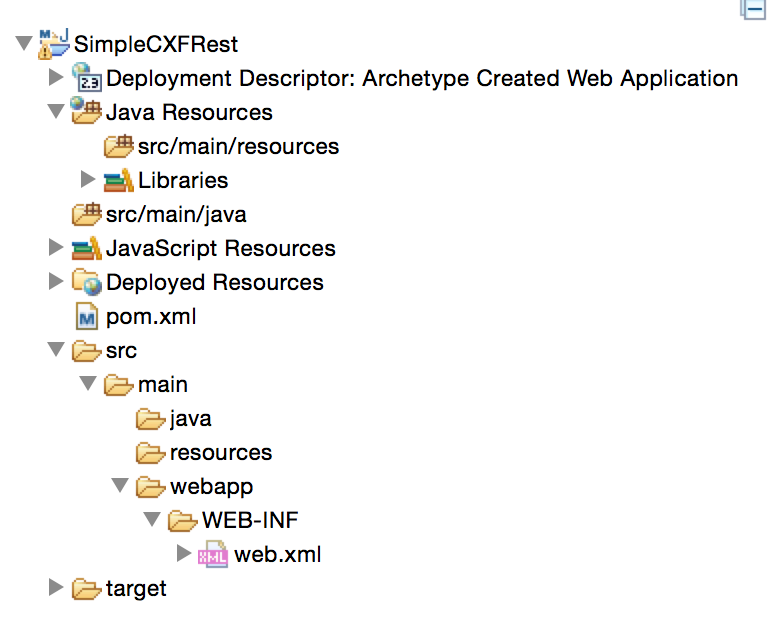
The default project structure will be created as follows:

Add Missing Folders and Delete index.jsp
- Right-click src/main
- New -> Folder -> java
- Delete src/main/webapp/index.jsp
Add Maven Dependencies
In order to return json from our web service, we are going to use Jackson for our json mapping. We need to edit the pom.xml to add:
<!-- Jackson -->
<dependency>
<groupId>org.codehaus.jackson</groupId>
<artifactId>jackson-jaxrs</artifactId>
<version>1.9.13</version>
</dependency>
This gives a full the pom.xml as follows:
<project xmlns="http://maven.apache.org/POM/4.0.0" xmlns:xsi="http://www.w3.org/2001/XMLSchema-instance"
xsi:schemaLocation="http://maven.apache.org/POM/4.0.0 http://maven.apache.org/maven-v4_0_0.xsd">
<modelVersion>4.0.0</modelVersion>
<groupId>com.skills421.cxf</groupId>
<artifactId>SimpleCXFRest</artifactId>
<packaging>war</packaging>
<version>0.0.1-SNAPSHOT</version>
<name>helloweb Maven Webapp</name>
<url>http://maven.apache.org</url>

<properties>
<spring.version>3.1.0.RELEASE</spring.version>
<cxf.version>2.7.0</cxf.version>
<junit.version>4.11</junit.version>
<jackson.version>1.9.13</jackson.version>
</properties>

<dependencies>
<!-- Spring -->
<dependency>
<groupId>org.springframework</groupId>
<artifactId>spring-context</artifactId>
<version>${spring.version}</version>
</dependency>

<dependency>
<groupId>org.springframework</groupId>
<artifactId>spring-web</artifactId>
<version>${spring.version}</version>
</dependency>

<!-- CXF -->
<dependency>
<groupId>org.apache.cxf</groupId>
<artifactId>cxf-rt-frontend-jaxrs</artifactId>
<version>${cxf.version}</version>
</dependency>

<!-- Jackson -->
<dependency>
<groupId>org.codehaus.jackson</groupId>
<artifactId>jackson-jaxrs</artifactId>
<version>${jackson.version}</version>
</dependency>

<!-- JUnit -->
<dependency>
<groupId>junit</groupId>
<artifactId>junit</artifactId>
<version>${junit.version}</version>
<scope>test</scope>
</dependency>
</dependencies>
<build>
<finalName>SimpleCXFRest</finalName>

<plugins>
<plugin>
<groupId>org.apache.maven.plugins</groupId>
<artifactId>maven-compiler-plugin</artifactId>
<version>3.0</version>
<configuration>
<source>1.6</source>
<target>1.6</target>
</configuration>
</plugin>
</plugins>
</build>
</project>
Update the Project
Right-click on the project and select Maven -> Update Project.
Modify web.xml
Modify web.xml to include the servlets as follows:
<!DOCTYPE web-app PUBLIC
"-//Sun Microsystems, Inc.//DTD Web Application 2.3//EN"
"http://java.sun.com/dtd/web-app_2_3.dtd" >

<web-app>
<display-name>Simple CXF Rest</display-name>

<!-- Spring -->
<context-param>
<param-name>contextConfigLocation</param-name>
<param-value>WEB-INF/beans.xml</param-value>
</context-param>

<listener>
<listener-class>org.springframework.web.context.ContextLoaderListener</listener-class>
</listener>

<!-- CXF -->
<servlet>
<servlet-name>CXFServlet</servlet-name>
<display-name>CXF Servlet</display-name>
<servlet-class>org.apache.cxf.transport.servlet.CXFServlet</servlet-class>
<load-on-startup>1</load-on-startup>
</servlet>

<servlet-mapping>
<servlet-name>CXFServlet</servlet-name>
<url-pattern>/rest/*</url-pattern>
</servlet-mapping>
</web-app>
Create beans.xml
In the WEB-INF folder, create the file beans.xml.
In order to return Json we need to add our JacksonJsonProvider bean, giving us a beans.xml as follows:
<?xml version="1.0" encoding="UTF-8"?>
<beans xmlns="http://www.springframework.org/schema/beans"
xmlns:xsi="http://www.w3.org/2001/XMLSchema-instance" xmlns:jaxrs="http://cxf.apache.org/jaxrs"
xmlns:jaxws="http://cxf.apache.org/jaxws" xmlns:context="http://www.springframework.org/schema/context"
xsi:schemaLocation="
http://www.springframework.org/schema/beans
http://www.springframework.org/schema/beans/spring-beans.xsd
http://www.springframework.org/schema/context
http://www.springframework.org/schema/context/spring-context.xsd
http://cxf.apache.org/jaxrs
http://cxf.apache.org/schemas/jaxrs.xsd
http://cxf.apache.org/jaxws
http://cxf.apache.org/schemas/jaxws.xsd">

<import resource="classpath:META-INF/cxf/cxf.xml" />
<import resource="classpath:META-INF/cxf/cxf-servlet.xml" />

<context:component-scan base-package="com.skills421.services" />

<!-- JAX-RS -->
<jaxrs:server id="restContainer" address="/">
<jaxrs:serviceBeans>
<ref bean="simpleRestService" />
<ref bean="customerService" />
</jaxrs:serviceBeans>
<jaxrs:providers>
<bean class="org.codehaus.jackson.jaxrs.JacksonJsonProvider"/>
</jaxrs:providers>

</jaxrs:server>
</beans>

<!-- http://cxf.apache.org/docs/jax-rs-and-jax-ws.html -->
Create the Restful Service
In src/main/java create the following class in the correct package
package com.skills421.services;

import javax.ws.rs.GET;
import javax.ws.rs.Path;
import javax.ws.rs.PathParam;
import javax.ws.rs.Produces;
import javax.ws.rs.core.MediaType;
import javax.ws.rs.core.Response;
import javax.ws.rs.core.Response.Status;

import org.springframework.stereotype.Service;

import com.skills421.model.Customer;

@Service
@Path("/customer")
public class CustomerService
{
@GET
@Path("/find/{id}")
@Produces("application/json")
public Response find(@PathParam("id") int id)
{
Customer customer = new Customer(1,"Jon Doe",21);

return Response.status(Status.OK).entity(customer).type(MediaType.APPLICATION_JSON).build();
}
}
Run the Project
Right-click on the project -> Run As -> Run on Server
select a server to run on, (Tomcat 7 will run without errors).
Test the Service
Open the web browser and enter the following url:
http://localhost:8080/SimpleCXFRest/rest/customer/find/1
Your web browser should display the following:
{“id”:1,”name”:”Jon Doe”,”age”:21}



 Skills421
Leave a reply to Using rest-shell to test rest services | Skills421 Cancel reply