I do not want to go into a lot of detail here, because the JMS Documentation is very good.
This post is more an abridged description, with working code.
Install ActiveMQ
First install ActiveMQ as per my previous post.
Start ActiveMQ as per the instructions in the previous
activemq restart
Open the web browser and view the queues.
http://localhost:8161/admin/queues.jsp
 There should be no visible queues.
Create the Project
<project xmlns="http://maven.apache.org/POM/4.0.0" xmlns:xsi="http://www.w3.org/2001/XMLSchema-instance"
xsi:schemaLocation="http://maven.apache.org/POM/4.0.0 http://maven.apache.org/xsd/maven-4.0.0.xsd">
<modelVersion>4.0.0</modelVersion>
<groupId>com.skills421.camel.basics</groupId>
<artifactId>CamelBlog</artifactId>
<version>0.0.1-SNAPSHOT</version>

<dependencies>

<!-- Needed for ActiveMQ - JMS -->
<dependency>
<groupId>org.apache.activemq</groupId>
<artifactId>activemq-core</artifactId>
<version>5.3.2</version>
</dependency>

<!-- JUnit for testing -->
<dependency>
<groupId>junit</groupId>
<artifactId>junit</artifactId>
<version>4.11</version>
</dependency>
</dependencies>

<build>
<plugins>
<plugin>
<groupId>org.apache.maven.plugins</groupId>
<artifactId>maven-compiler-plugin</artifactId>
<version>3.0</version>
<configuration>
<source>1.6</source>
<target>1.6</target>
</configuration>
</plugin>
</plugins>
</build>
</project>
JMS API Programming Model
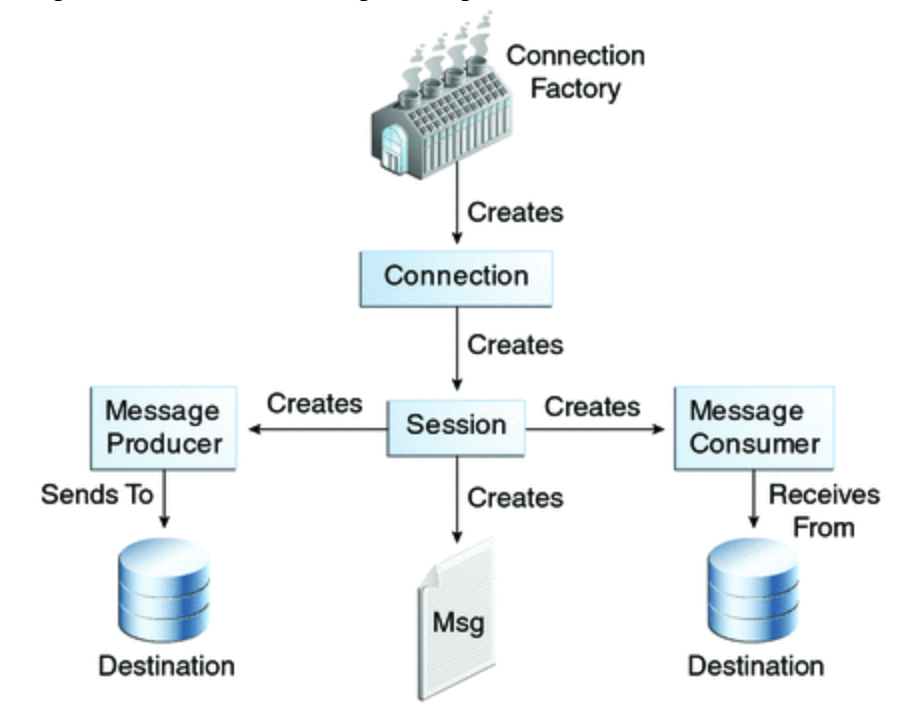
x


 Skills421
Leave a comment